We built Conduck so we can't see your data.
No Conduck-operated intermediary server sits between you and your AI. Conversation history stays on your devices and in your private iCloud; saved keys stay in Keychain and are sent only to the service they authenticate. Apple's on-device speech stays local. If you choose a cloud voice or AI, what you send goes to that service under your own key. Here's exactly how it works - and where the limits are.

What's true the moment you install.
No Conduck backend
We run no server of our own. There's nothing in the middle to log, leak, or hand over.
No telemetry
No analytics code in the app, no ad SDK, no crash SDK of ours - and no server of ours to send any of it to.
No Conduck account
Conduck creates a random app ID in your Keychain and, when iCloud is available, mirrors it into your private iCloud key-value store. It is never sent to us or your AI.
Keys in your Keychain
Keys live in the Apple Keychain. With iCloud Keychain, synchronizable items can move end-to-end encrypted between iPhone, iPad, and Mac; Watch gets a local copy from its paired iPhone.
On-device speech by default
Fresh installs transcribe on your device with Apple's engine. A cloud voice is opt-in, with your own key.
Conversations in your iCloud
Stored on your device and your private iCloud database, encrypted by Apple - the way your Notes are.
How Conduck works
Connections, storage and sync across your Apple devices, in one diagram.
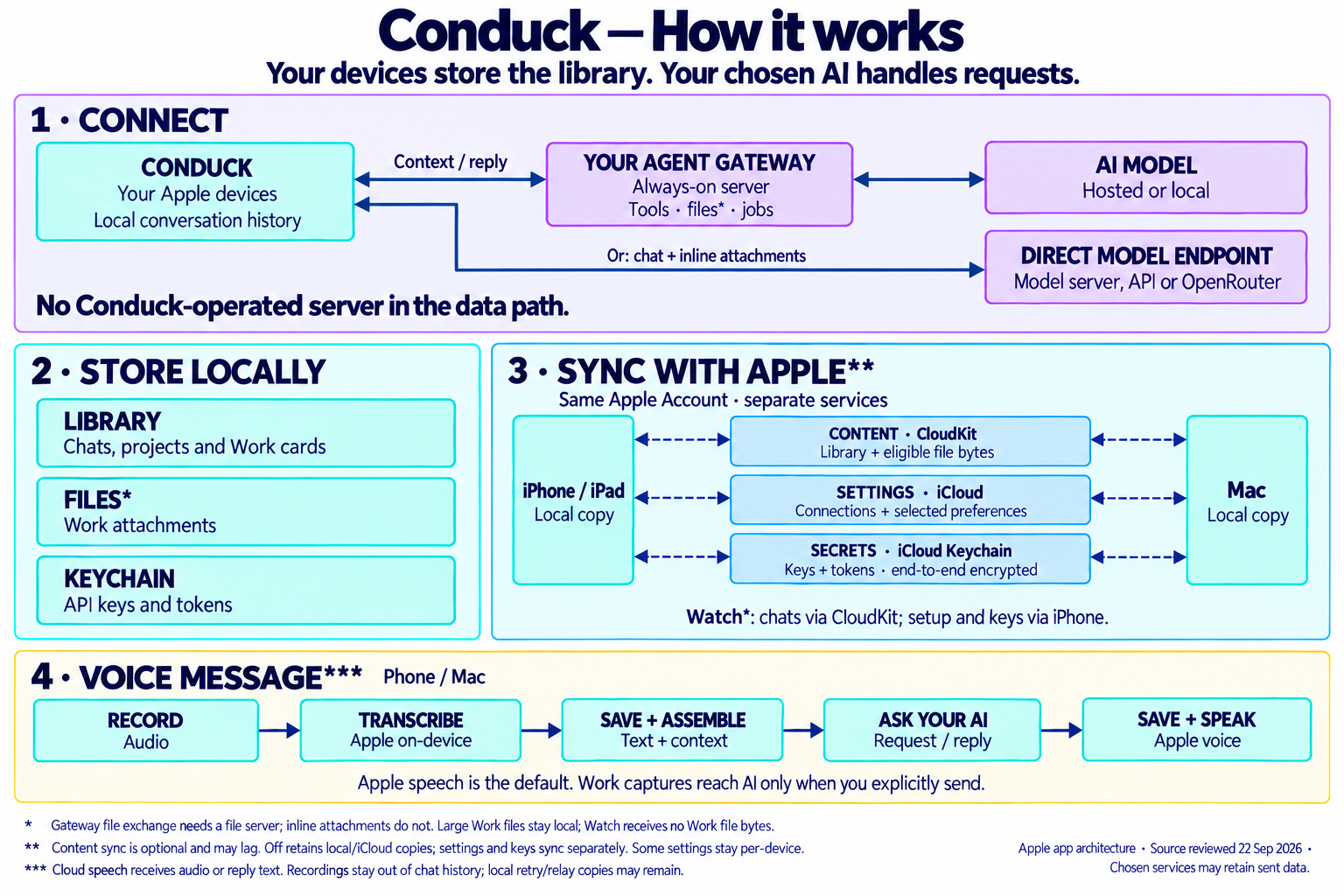
Read the diagram as text
Conduck sends context to your chosen agent gateway, which connects to a hosted or local AI model. You can also connect directly to a model server, API or OpenRouter for chat and inline attachments. No Conduck-operated server sits in the data path.
Chats, projects, Work cards and attachments live on your device; keys and tokens live in Keychain. Gateway file exchange needs a file server, but inline attachments do not. Large Work files stay local, and Watch receives no Work file bytes.
Devices on the same Apple Account use separate services: CloudKit for library content and eligible files, iCloud for connections and selected preferences, and end-to-end encrypted iCloud Keychain for keys and tokens. Content sync is optional and may lag; switching it off retains existing local and iCloud copies. Settings and keys sync separately, and some settings stay per-device. Watch syncs chats through CloudKit and gets setup and keys from its paired iPhone.
On phone and Mac, Apple speech is the default: transcribe audio, save text and assemble context, ask your AI, then save the reply and optionally speak it. Optional cloud speech receives audio or reply text. Recordings stay out of chat history; local retry or relay copies may remain temporarily. Work captures reach AI only when you explicitly send them. Chosen services may retain data you send.
Where your words actually go.
From the moment you speak to the moment the reply syncs back - every hop, and who's in it.
You speak or type
On your iPhone, iPad, Mac, Apple Watch, or CarPlay.
Your words become text
On-device by default - your voice never leaves the device. Or choose a cloud transcriber and the audio goes straight there, under your own key.
On-device · or your cloud keyStraight to your AI
Sent directly to the AI you chose - the server you run, or the provider you pay - with your own key, over HTTPS whenever it leaves your own network. No Conduck-operated server relay in between.
Your AI answers
The model runs on the machine you host, or with the provider you picked under your own key, and the reply returns the same way. That server does receive your message - that's how it answers. Conduck sends this chat's context with each request rather than relying on a copy kept there.
Read aloud, if you want
Apple's on-device voice by default; a cloud voice is opt-in with your key. Spoken replies are off by default everywhere except CarPlay.
On-device · or your cloud keySaved on your device, synced by your iCloud
The thread is stored in the app's on-device database and synced across your devices through your own private iCloud. We keep no copy.
Direct, not routed.
The same private AI, reached three different ways.
| Conduck | Vendor cloud app | Self-host via a chat bridge* | |
|---|---|---|---|
| Where conversations live | Your device + your own iCloud | The vendor's servers | Your server - but messages pass through the chat platform |
| Who holds your keys | You, in your Keychain | The vendor | You, plus the bridge / bot host |
| A third party in the middle | No Conduck server relay | The vendor, always | The messaging platform's servers |
| Telemetry / analytics | None of ours | Typically yes | Varies by bridge & setup |
| Signing in | No Conduck account - nothing to sign into | An account tied to you | Your chat-app account + a bot |
| Transport | Direct HTTPS to your AI - plain http only to your own network | HTTPS to the vendor | Through the messaging platform |
| App Store privacy label | Data Not Collected | Varies by vendor | - |
| Best fit | Apple-native, direct control of your own AI | Turnkey - nothing to host | Reach your AI from chat apps you already use |
* A “chat bridge” means reaching a self-hosted AI through a chat-app bot - for example a Telegram or WhatsApp bridge. Exact behavior depends on the bridge and the services you pick; this describes common setups, not any specific product.
Where the trust boundary ends.
What “we never see your data” does - and doesn't - cover.
Your providers see what you send them
The AI you connect, its model provider, and any cloud voice you pick receive your messages to do their job. Their retention and use are set by their terms - choose them like any vendor.
HTTPS protects the trip, not the destination
Encryption keeps your data private on the way. What a provider does once it arrives is up to that provider. There is one address Conduck accepts without it: a server only your own network can reach, at a private IP address or a .local name - so a bare Ollama or a home Open WebUI box works without a certificate. Conduck says so on screen when you save one: that traffic is unencrypted, readable by anyone else on that network, and reachable only from it. Everything that leaves your network is HTTPS.
iCloud sync is Apple's system, not ours
Your conversations sync through whichever iCloud account is signed in. It's blind to us, but it's governed by Apple and your own iCloud settings.
Attachments go where you send them
A photo or screenshot is sent to your AI when you hit send - so it can contain whatever was on your screen. And when your AI writes a file back, the chat may keep a small preview of it, synced through your own iCloud like the rest of the conversation.
Your setup code is a reusable key
It carries your server's key - and the file password, if you set one up - so whoever scans or photographs it gets the access you have, including whatever tools and files that server allows. It keeps working until you rotate those secrets, and rotating cuts off every copy at once.
Your shared folder is one trust domain
If you set up file transfer, that folder is a single space with nothing walled off inside it. Your agent can read anything in there, and can send what it reads on to your model provider when a message asks it to. Keep keys, credentials, and private documents somewhere else.
Apple counts, we don't
Apple hands every developer plain totals about their own app, and we do read them: App Store downloads, anonymized crash reports, and - through Apple's CloudKit console - how many iCloud accounts sync with Conduck and how often that sync errors. They're numbers with nobody's name on them. None of them comes from anything Conduck sends, not one can be traced back to you, and it's the only usage signal we have. We may publish these figures.
Inspect the implementation.
Conduck's application source is public on GitHub under Apache 2.0. Official App Store builds are made from that source, with brand artwork, signing, and Apple's CarPlay entitlement added for distribution. No functional code is withheld.
View Conduck sourceRead it in full.
This page explains the architecture. The privacy policy is the legal detail.